
An Open Letter to Zimbabwean Youth and Aspiring Entrepreneurs
Skills Series – Part 5 (Ngatitsvakei zvokuita, kwete kungoswera wakarara paden nekungogara pama bridge every day, Shanda Hama Shanda!)
Dear Reader,
Look around you.
Every office has computers. Every student has a laptop. Every business owner has a device they depend on. Every school, every clinic, every church, every shop — computers everywhere.
And every single one of those computers will eventually have a problem.

Screens crack. Keyboards stop working. Laptops overheat. Hard drives fail. Viruses attack. Systems slow down. Batteries die. Chargers stop charging. Software crashes.
When that happens, people do not throw their computers away. They look for someone who can fix them.
That someone could be you.

This is the fifth article in our skills series designed to help Zimbabweans survive, adapt, and thrive in an economy where jobs are scarce but opportunities are everywhere for those with skills. In Part 1, we covered Graphic Design. In Part 2, CCTV Installation. In Part 3, Floor and Wall Tiling. In Part 4, Car Import Clearing. Today, we explore one of the most consistently in-demand skills in Zimbabwe: Computer and Laptop Repair.
Why Computer Repair Is a Skill Worth Learning
The demand never stops.
As long as people use computers, there will be computers that break. This is not a seasonal business. It is not dependent on construction booms or import regulations. Every single day, somewhere in Zimbabwe, a laptop screen cracks, a desktop refuses to start, or a virus destroys someone’s files.
Every business needs you.
Schools need their computer labs working. Offices need their systems running. Shops need their point-of-sale machines functional. Internet cafes need their machines operational. When things break, business stops — and business owners will pay to get back up and running quickly.

Low startup costs.
You do not need a fancy shop to start. Many successful computer technicians began working from home, from a small room, or even doing house calls. Your initial investment is in skills and basic tools — not expensive premises.
You can specialise and grow.
Start with basic repairs, then expand into data recovery, networking, server maintenance, CCTV installation, or even selling refurbished computers. The skills you learn open doors to multiple income streams.
What Computer Repair Technicians Do
As a computer repair technician, you will handle:

Hardware repairs:
– Replacing broken screens on laptops
– Upgrading RAM and storage (HDD to SSD)
– Replacing damaged keyboards and touchpads
– Fixing charging ports and power issues
– Replacing batteries
– Cleaning dust from fans and cooling systems
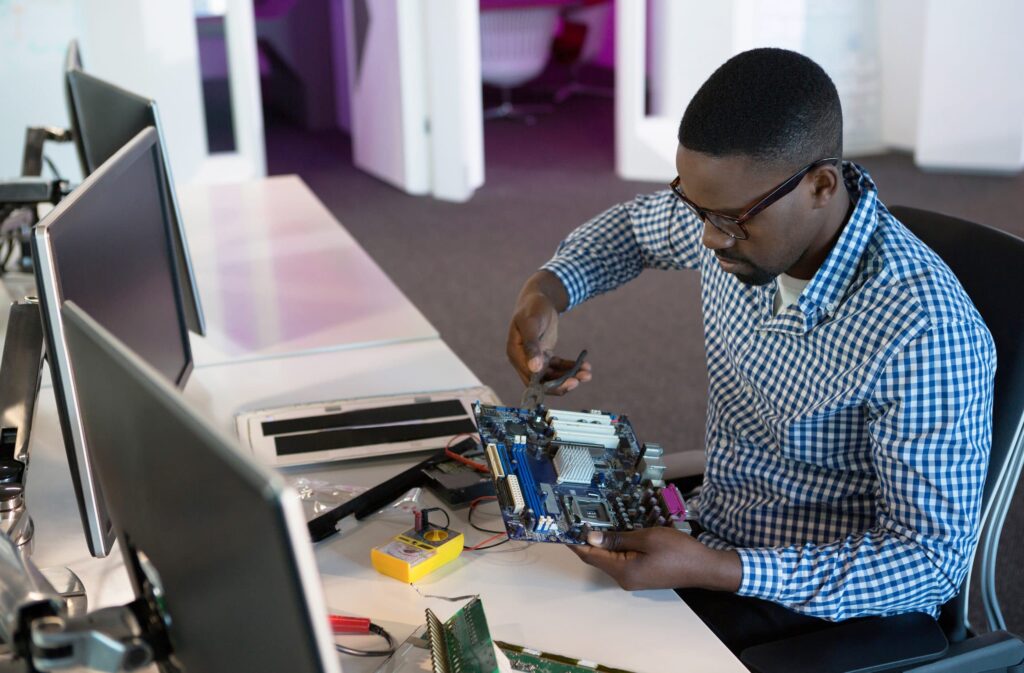
– Repairing or replacing motherboards
– Fixing desktop power supply units
Software troubleshooting:
– Removing viruses and malware
– Reinstalling Windows and other operating systems
– Recovering lost or deleted data
– Speeding up slow computers
– Installing and configuring software
– Fixing boot errors and blue screen issues
– Setting up backup systems
Networking:
– Setting up home and office WiFi networks
– Configuring routers and access points
– Troubleshooting internet connectivity issues
– Setting up shared printers and file sharing

Peripheral repairs:
– Fixing printers and scanners
– Repairing projectors
– Troubleshooting external drives and USB devices
Free Online Courses to Learn Computer Repair
The good news is that you can start learning this skill today, for free, from your phone or any computer with internet access.
1. Google IT Support Professional Certificate (Coursera)
This is one of the most comprehensive free resources available. Created by Google, it covers everything from hardware components to operating systems to networking and security.

– Cost: Free to audit (you can watch all videos and access readings without paying)
– Duration: About 6 months at 10 hours per week
– What you learn: Troubleshooting, customer support, networking, operating systems, system administration, security, how to assemble a computer from scratch
– Bonus: Prepares you for CompTIA A+ certification exams
– Best for: Those who want a complete foundation and are considering IT as a career
– Access: https://www.coursera.org/professional-certificates/google-it-support
Tip: You can audit individual courses like “Technical Support Fundamentals” for free. This gives you access to all video lectures and readings.
2. Carnegie Mellon University — PC Hardware (Open Learning Initiative)
This is a university-level course offered completely free by Carnegie Mellon University. It is structured, academic, and thorough.

– Cost: Completely free
– What you learn: BIOS/UEFI configuration, RAM and CPU replacement, storage devices, cooling systems, system boards, video, memory, multimedia, networking, and printers
– Bonus: Aligned with CompTIA A+ Hardware Exam objectives
– Best for: Beginners who want an academic and highly structured approach
– Access: https://oli.cmu.edu/courses/pc-hardware-open-free/
3. Alison — Computer Maintenance and PC Building
Alison offers free courses with optional certificates. This course covers the fundamentals of computer maintenance and building PCs from components.
– Cost: Free to study (certificate available for purchase)
– What you learn: Computer maintenance, PC building, hardware components, troubleshooting
– Certificate: Free digital certificate available upon 80% completion
– Access: https://alison.com/course/computer-maintenance-and-pc-building

4. Cursa — Maintenance of Computers and Notebooks
Cursa offers completely free courses with free certificates. Their computer maintenance courses are beginner-friendly and practical.
– Cost: Completely free with free certificate
– What you learn: How to fix and assemble computers, hardware basics, networking fundamentals
– Best for: Beginners who want a quick start
– Access: https://cursa.app/free-courses-maintenance-of-computers-and-notebooks-online
5. Elevify — Computer Repair Course
Elevify offers a practical, hands-on course focused on real-world repair workflows.

– Cost: Free (90-day access, 1 hour per day limit); Premium $37 for certificate and unlimited access
– What you learn: PC diagnostics and repair, intake questioning, safe disassembly, internal inspections, PSU, RAM, CPU, GPU and storage testing, malware removal, Windows repair, data backup, clean installs
– Best for: Those who want practical, job-ready skills
– Access: https://www.elevify.com/en-us/courses/engineering-construction-and-technology/technology/computer-repair-course-562f5
6. Apple Training (For MacBook and Apple Device Repair)
Apple provides free, self-paced training for their devices. If you want to specialise in Apple products, this is essential.
– Cost: Free
– What you learn: Supporting and troubleshooting macOS, hardware diagnostics for MacBooks, security compliance
– Best for: Anyone interested in repairing Macs, iPads, and iPhones
– Access: https://training.apple.com

Note: Many repair shops in Zimbabwe receive MacBooks. Knowing how to repair Apple devices sets you apart from other technicians.
7. iFixit — Skills Help and Repair Guides
iFixit is not just a manual site — it is a massive community-led educational resource. Their “Skills” section teaches you the physical mechanics of repair.
– Cost: Free
– What you learn: Soldering basics, how to ground yourself (ESD safety), tool selection, and model-specific laptop teardowns
– Best for: Visual learners who want to see exactly how to open a specific laptop model without breaking clips
– Access: https://www.ifixit.com/Device/Skills
This is incredibly practical. Before opening any laptop, check iFixit for a teardown guide specific to that model.
8. Electronics Repair School (YouTube)
For those who want to go beyond swapping parts and learn how to actually fix motherboards, this YouTube-based curriculum is industry-renowned.
– Cost: Free
– What you learn: Microsoldering, reading schematics, using a multimeter, identifying short circuits on a PCB
– Best for: Advanced learners who want to repair water-damaged laptops or “dead” boards
– Access: https://www.youtube.com/@electronicsrepairschool/
This takes you from “part swapper” to actual motherboard repair technician — a much higher-paying skill level.
9. YouTube Tutorials (General)
YouTube is filled with free computer and laptop repair tutorials. You can find step-by-step guides for almost any repair task.
– Cost: Free
– What you learn: Everything from basic troubleshooting to advanced motherboard repair
– Best for: Visual learners who want to see repairs done in real-time
– Search: https://www.youtube.com/results?search_query=computer+and+laptop+repair+course
Tip: Search for the specific problem you are trying to solve (e.g., “HP laptop screen replacement” or “how to fix laptop not turning on”) and you will find detailed tutorials.
Paid Courses in Zimbabwe
While online courses provide excellent theoretical knowledge, we strongly encourage you to also pursue structured, in-person training with instructors and hands-on practice. Several institutions in Zimbabwe offer computer repair courses where you can work on real machines, ask questions directly, and get supervised practice.
1. Ixar Academy (Harare)
– Course: Computer, Printer and Projector Repair Course
– Duration: 3 months
– Fee: $100 per month ($300 total)
– Contact: +263 786 329 089
– Location: 1st Floor, Batanai Gardens, Corner 1st & Jason Moyo, Harare
2. Peoples College (Harare)
– Course: PC Repairs Certificate
– Duration: 3 months
– Fee: $60 per month ($180 total)
– Contact: +263 242 752 036 / +263 712 402 030 / +263 786 389 588
– Location: Number 112, Mbuya Nehanda Street, Harare
3. Purple Apex Learn Digital Skills Training Institute (Harare)
– Course: Laptop Computer Repair
– Duration: 1 month
– Fee: $80 for the full course
– Contact: +263 776 888 326
– Location: 83 Sam Munjoma Street, Corner Second Street and Herbert Chitepo, Gollop and Blank Building, 4th Floor, Harare
4. Gweru Institute of Technology (Gweru)
– Course: Laptop and Cellphone Repairing Course
– Duration: 3 months
– Fee: $20 registration + $99 per month ($317 total)
– Contact: +263 54 2222 144 / +263 715 232 000
– Location: 473-26L Takawira Road, Gweru, Methodist Central Church
5. TGS College (Epworth, Harare)
– Course: Computer Repair Course
– Duration: 6 months
– Fee: $20 application fee + $800 once off OR $300 per semester × 3 ($920 total)
– Contact: +263 789 480 800
– Location: Stopover, Epworth, Harare
Tools You Will Need
To start doing computer repairs, you will need some basic tools:
Essential starter kit:
– Precision screwdriver set (Phillips and flathead in various sizes)
– Plastic pry tools and spudgers (for opening laptops without damage)
– Anti-static wrist strap (to prevent damaging components with static electricity)
– Compressed air or blower (for cleaning dust)
– Thermal paste (for CPU and GPU cooling)
– Multimeter (for testing power and continuity)
– USB flash drives (for bootable recovery tools)
As you grow:
– Soldering iron and soldering station
– Hot air rework station (for motherboard-level repairs)
– Oscilloscope (for advanced diagnostics)
– Ultrasonic cleaner (for water-damaged boards)
– Laptop battery tester
– Hard drive dock for data recovery
You do not need everything at once. Start with the essentials and add tools as your skills and income grow.
How Much Can You Earn?
Computer repair pricing in Zimbabwe varies, but here are typical rates:
Software services:
– Windows installation: $10-20
– Virus removal: $10-15
– Data backup and transfer: $10-20
– Software installation: $5-10
Hardware repairs:
– Screen replacement: $20-50 labour (plus cost of screen)
– Keyboard replacement: $15-30 labour
– RAM or SSD upgrade: $10-20 labour
– Charging port repair: $15-30
– Battery replacement: $10-15 labour
– General diagnosis: $5-10
Advanced repairs:
– Motherboard repair: $30-100+ depending on complexity
– Data recovery from failed drives: $50-200+
– Liquid damage repair: $50-150+
If you handle just 3-4 repairs per day at an average of $15-20 each, that is $45-80 per day. In a month, that is $1,000-2,000+ — and this is before you factor in selling parts, accessories, or refurbished machines.
How to Find Customers
Start with your network.
Tell everyone you know that you repair computers. Family, friends, neighbours, church members, former classmates. Word of mouth is powerful.
Social media presence.
Create a Facebook page and WhatsApp Business account. Post before-and-after photos of repairs. Share tips about computer maintenance. Join local buy-and-sell groups and community pages.
Partner with businesses.
Approach internet cafes, schools, offices, and shops. Offer to be their go-to technician. Many businesses need reliable, on-call support.
Offer house calls.
Many people do not want to carry their desktop or laptop somewhere. Offering to come to them is a competitive advantage.
Referral program.
Give existing customers a reason to refer others. A small discount or free service for referrals can multiply your customer base.
From Technician to Business Owner
The goal is not just to fix computers forever. The goal is to build something bigger.
Hire assistants.
As you get busier, bring on helpers to handle simpler tasks while you focus on complex repairs and customer relationships.
Open a shop.
Once you have consistent income, consider a small shop in a visible location. A physical presence builds trust and attracts walk-in customers.
Sell parts and accessories.
Stock commonly needed items — chargers, batteries, RAM, SSDs, keyboards, screens. You make money on both the part and the labour.
Refurbish and sell computers.
Buy broken laptops cheaply, repair them, and sell at a profit. This can become a significant income stream.
Import and resell computers.
Once you understand the market and what sells, consider importing laptops and computers from South Africa, China, or Dubai. Many technicians graduate from repairs into trading — buying in bulk at lower prices abroad and selling locally. Your technical knowledge gives you an advantage: you can inspect machines, identify good deals, and avoid faulty stock that others might not catch.
Expand into related services.
CCTV installation, networking, phone repair, printer servicing, IT support contracts with businesses. Your computer repair skills are the foundation for many related services.
Final Encouragement
Computer repair will not make you rich overnight. You will need to learn, practice, make mistakes, and build your reputation over time.
But the demand is constant. Every day, computers break. Every day, someone needs a technician they can trust.
The free courses are available right now. The paid courses are affordable. The tools are not expensive to start. The customers are already looking for someone reliable.
The question is: will you be that someone?
This is the fifth skill in our series. We have covered graphic design, CCTV installation, floor tiling, car import clearing, and now computer repair. Different skills for different people. Somewhere in this series is a skill that matches who you are and what you can do.
Find yours. Learn it. Build something.
With belief in your ability to create your own opportunity,
ZimLedger Admin

ZimLedger
ZimLedger is the all in one business and finance platform for Zimbabwe. It generates quotes, invoices, payslips and financial statements, manages business ledgers, tracks income and expenses, and builds shopping lists. ZimLedger offers a simple yet powerful solution tailored to local needs. Whether you are budgeting in ZiG or USD, managing business accounts, converting Ecocash statements, or tracking household expenses, ZimLedger empowers you to stay organised, make informed financial decisions, and grow your wealth—right from your phone or computer.